Is ArcTracer for Maya: the arc-trail plugin for animators tired of guessing spacing worth buying right now?
Quick answer
| Best for | Maya animators who are sick of scrubbing timelines to check if a hand or head movement actually follows a clean arc, and want real-time visual feedback without writing custom MEL scripts. |
| Skip if | You work exclusively in Blender, Houdini, or Unreal, or if you rely on free, community-made plugins that don’t require a license key. |
| Price | $49 |
| Format | C++ native plugin installer (drag-and-drop) + tutorial video for FK mode |
| One-line take | A $49 investment that replaces guesswork with a live, color-coded arc trail and automatic smoothing—rare for a tool this specific. |
What you’re actually buying
If you’ve ever spent ten minutes scrubbing back and forth on a timeline just to see if a character’s head movement feels “off,” you know the pain. You’re not just keying positions; you’re trying to sculpt invisible curves in 3D space. ArcTracer for Maya solves this by projecting those curves directly into your viewport. It’s not a generic motion graph overlay; it’s a dedicated trajectory visualizer built as a native C++ plugin, meaning it runs fast and doesn’t bog down your viewport even on complex scenes.
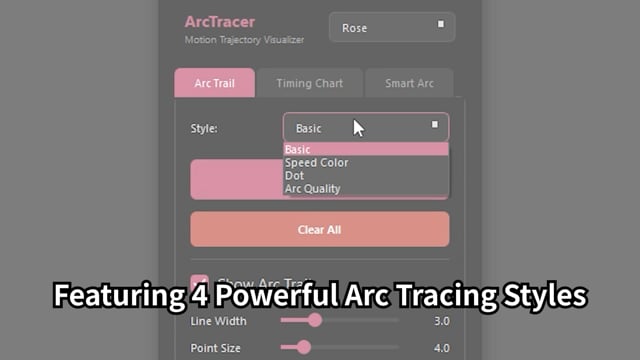
For $49, you’re getting a complete toolkit for arc analysis. The core feature is the Arc Trail Visualization, which offers four distinct display styles: Basic, Speed Color, Dot, and Arc Quality. This isn’t just a line; it’s a diagnostic tool. You can toggle Screen Space mode for animated camera shots (so the arc doesn’t distort as the camera moves) and use Ghost mode to isolate specific sections of the animation. The Speed Color style is particularly useful for spotting timing issues at a glance, showing you where your character is accelerating or decelerating through the arc. (ArcTracer for Maya: the)
Beyond just seeing the arc, ArcTracer lets you fix it. The Smart Arc technology is the real game-changer here. In IK mode, it automatically generates smooth arc trajectories using a Bezier curve fitting algorithm, with a filter slider that lets you dial in everything from local smoothing (0%) to global smoothing (100%). If you’re working with FK chains, the plugin smooths rotation curves to remove jitter and noise, and you can even drag a time range on the slider to modify only specific sections. It’s a rare combination of visualization and correction in a single $49 tool. (ArcTracer for Maya: the)
The plugin is built for modern pipelines. It supports Maya 2022 through 2027.0 on Windows 10/11 (64-bit), and includes vertex tracking for Maya 2024+. Installation is a simple drag-and-drop of the installer into your Maya viewport—no complex script setups or environment variables. You also get a tutorial video for the Smart Arc FK mode included in the download, which is a nice touch for a tool this technical. If you’re already using other precision tools, the seller also offers Detail Tweak, a companion plugin for micro-adjustments, but ArcTracer stands on its own as a complete arc-solution. (ArcTracer for Maya: the)
Why it’s on our radar
Most arc tools in Maya are either free, basic MEL scripts that lag on complex scenes, or part of expensive, all-in-one animation suites. ArcTracer hits a sweet spot: it’s a single-purpose, native C++ plugin that focuses entirely on motion trajectories. The fact that it includes both visualization (with four display styles and screen-space support) and automatic smoothing (Smart Arc for both IK and FK) makes it a complete workflow tool rather than just a display helper. (ArcTracer for Maya: the)
The specificity of the listing is impressive. It’s not just “see arcs”; it’s “see arcs with speed coloring, ghosting, and quality metrics, then fix them with Bezier fitting.” That level of detail suggests a tool built by an animator who actually uses it, not just a developer shipping a generic feature. The $49 price point is also reasonable for a plugin that can save you hours of scrubbing and tweaking on every animation shot. (ArcTracer for Maya: the)
What actually matters
Before you buy, check your Maya version. ArcTracer supports Maya 2022 through 2027.0, so if you’re on an older version, you’ll need to upgrade. It’s also Windows-only (10/11, 64-bit), so Mac users should look elsewhere. (ArcTracer for Maya: the)
Make sure you understand the difference between the IK and FK modes for Smart Arc. The IK mode generates new arc trajectories, while the FK mode smooths existing rotation curves. If you’re primarily working with FK rigs, the included tutorial video will be essential. Also, note that vertex tracking is only available in Maya 2024+, so if you’re on 2022 or 2023, you’ll be using standard joint tracking. (ArcTracer for Maya: the)
Finally, consider your viewport performance. Since it’s a C++ native plugin, it should be fast, but if you’re working on extremely dense scenes with thousands of joints, test it on a small shot first to ensure it doesn’t impact your frame rate. The drag-and-drop installation is simple, but always back up your Maya preferences before installing new plugins. (ArcTracer for Maya: the)
Mid-check
FAQ
Does ArcTracer work with animated camera shots? Yes. The plugin includes a Screen Space mode specifically designed for animated camera shots. This ensures the arc visualization remains accurate and undistorted even as the camera moves through the scene. (ArcTracer for Maya: the)
Can I smooth only a specific part of the animation? Absolutely. In the FK Chain Mode, you can drag a time range on the time slider to modify only specific sections of the animation. This is incredibly useful for fixing jitter in a single gesture without affecting the rest of the shot. (ArcTracer for Maya: the)
Is there a Mac version available? No. ArcTracer is currently available for Windows 10/11 (64-bit) only. If you’re a Mac user, you’ll need to look for alternative arc visualization tools or use a Windows machine for your Maya workflow. (ArcTracer for Maya: the)
How is installation handled? Installation is a simple drag-and-drop process. You just drag the installer file into your Maya viewport. There’s no need to manually copy files to your scripts folder or set up environment variables. (ArcTracer for Maya: the)
Does it support Maya 2024 and later? Yes. ArcTracer supports Maya 2022, 2023, 2024, 2025, 2026, and 2027.0. It also includes vertex tracking features for Maya 2024 and later versions. (ArcTracer for Maya: the)
Bottom line
If you’re a Maya animator who’s tired of guessing whether your motion follows clean arcs, ArcTracer is a no-brainer. For $49, you get a fast, native C++ plugin that visualizes arcs in real-time with multiple display styles and automatically smooths problematic trajectories. It’s a specialized tool that does one job exceptionally well: making your motion look polished and professional. If you’re working on character animation, creature animation, or any shot where arc quality matters, this plugin will pay for itself in saved time and improved quality. (ArcTracer for Maya: the)