Abletonlive.aaf - The easiest way to co…: is this $59.99 stack worth it for Music & Sound Design?
If you have spent the last hour dragging audio clips into Ableton Live one by one, matching markers by eye, and manually adjusting fades because your NLE export didn’t translate, you know the pain. Post-production workflows often force a brutal choice: stay in Pro Tools or Premiere Pro and lose the flexibility of Ableton’s session view, or move to Ableton and spend hours rebuilding a timeline that already exists in another format. Abletonlive.aaf aims to kill that middle step. It is a dedicated conversion utility that reads AAF files from major DAWs and NLEs and generates a ready-to-use Ableton Live session, preserving the structure, automation, and clip placement you worked so hard to create. At $59.99, it is a one-time investment for a workflow problem that eats billable hours every time you switch tools.
Quick answer
| Best for | Post-production engineers and composers who finish in Ableton but edit in Pro Tools, Premiere Pro, or DaVinci Resolve. |
| Skip if | You work exclusively within Ableton Live or do not use AAF-compatible software for your source material. |
| Price | $59.99 (one-time, lifetime license) |
| Format | Desktop application (Windows 10/11, macOS 13+) + lifetime updates |
| One-line take | A precision tool that turns manual timeline rebuilding into a single-click conversion. |
What you’re actually buying
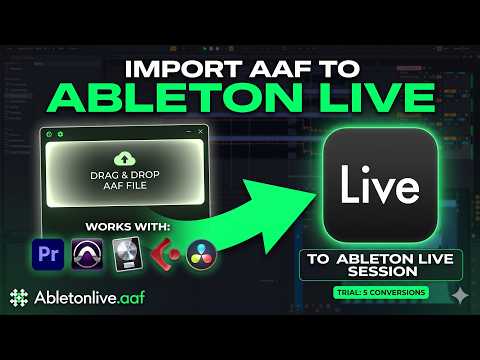
You are not buying a plugin or a VST; you are buying a bridge between your editing suite and your mixing environment. The core value here is the fidelity of the transfer. When you export an AAF file from Avid Pro Tools, Adobe Premiere Pro, or DaVinci Resolve, you usually lose the granular details that make a session “live” in Ableton. Abletonlive.aaf handles the heavy lifting by mapping precise audio clip placement to match your original timeline, ensuring that the start and end points of every clip land exactly where they should in the new .als file.
Beyond just moving the audio, the tool transfers the dynamic elements that are often stripped out in standard exports. Volume automation is mapped to Ableton mixer tracks, so your fader moves and volume rides survive the trip. Clip gain values are preserved on each individual audio clip, meaning you don’t have to re-normalize or adjust levels for every single take. It also handles fades and crossfades, imports markers, and maintains the full timeline structure. This is the difference between a file that is “close enough” and a session that is ready for immediate mixing. (Abletonlive.aaf - The easiest)
Version 2.0.0, which is what you get with the current license, adds a layer of polish that makes the tool feel less like a script and more like a professional utility. The interface has been redesigned to show real-time conversion feedback, so you aren’t guessing if the process failed. You can set the BPM and time signature before conversion, which is critical for accurate placement in Ableton Live. If you are working with video, the tool includes MXF to WAV auto-conversion via a bundled FFmpeg, removing the need for manual transcoding steps. For DaVinci Resolve users, it even handles stereo channel splitting, ensuring L/R tracks are correctly separated. (Abletonlive.aaf - The easiest)
The license itself is straightforward: one computer, lifetime updates, and both Windows and macOS versions included. You don’t pay for v2.1 when it drops; it’s part of the $59.99 you pay today. The seller, TMK - XTERMINATORAPPS, positions this as a lifetime solution, which is a strong value proposition given that the tool addresses a specific, recurring technical hurdle rather than a one-time creative need. (Abletonlive.aaf - The easiest)
Why it’s on our radar
This tool stands out because it solves a specific, high-friction problem in a niche that is often overlooked by general-purpose DAW utilities. Most AAF converters are either free but buggy, or part of large, expensive suites that you don’t need if you just want to move files between Pro Tools and Ableton. Abletonlive.aaf focuses entirely on the conversion pipeline, adding features like MXF auto-conversion and DaVinci Resolve stereo splitting that are rare in standalone converters.
The “try before you buy” model is also a smart signal of confidence. You can download the installer and get five free conversions before you pay. This allows you to test the fidelity on your own actual projects—checking if your automation curves and marker placements survive the trip—without risking money. For a tool that promises to save you hours of manual work, being able to verify that promise on your own files is a significant advantage. (Abletonlive.aaf - The easiest)
One buyer noted that after trying other converters like AAFBridge, this was the best they had used, citing it as an “instant buy” decision. Another user mentioned wanting a solution like this for years, praising how easy it is to use. These reactions highlight a long-standing gap in the post-production workflow that this tool fills effectively. Gumroad reviews
What actually matters
Before you commit the $59.99, you need to confirm that your source material is compatible. The tool reads AAF files, so you must be able to export AAF from your editing software. This works out of the box for Avid Pro Tools, Adobe Premiere Pro, Adobe Audition, DaVinci Resolve, and Media Composer. If you are using a DAW that does not support AAF export, this tool will not help you. (Abletonlive.aaf - The easiest)
Check your Ableton Live version. The requirement is Ableton Live 10 or later (Intro, Standard, or Suite). If you are running an older version, you will need to upgrade before the converted files will open correctly. The tool generates .als files that rely on modern Ableton features for automation and clip handling, so compatibility is non-negotiable. (Abletonlive.aaf - The easiest)
Verify your operating system. The app runs on Windows 10/11 or macOS 13+. If you are on an older Mac or a Windows 7/8 machine, you are out of luck. The v2.0.0 release includes specific fixes for reliability, so ensure you are downloading the latest installer from the official site, not an old cached version. (Abletonlive.aaf - The easiest)
Finally, test the “five free conversions” on a complex project. Don’t just convert a simple two-track file. Use a project with multiple markers, volume automation, and crossfades. Open the resulting Ableton session and check if the fader positions and clip starts match your original timeline. If the fidelity is there, the tool pays for itself the first time you avoid manually dragging clips. See current options
Mid-check
If you are ready to stop rebuilding timelines by hand, the lifetime license includes all future updates, including the upcoming v2.1 features like batch conversion. (Abletonlive.aaf - The easiest)
FAQ
Does Abletonlive.aaf work with Premiere Pro? Yes, it is fully compatible with Adobe Premiere Pro. You export your sequence as an AAF file from Premiere, then use Abletonlive.aaf to convert it into an Ableton Live session. It also handles MXF to WAV conversion if your media is in that format.
Can I use it on both Mac and Windows? Yes, the $59.99 license includes both Windows and macOS versions. You can install it on your primary computer and use the license management system to activate it. The tool is designed to work on Windows 10/11 and macOS 13 or later. (Abletonlive.aaf - The easiest)
Is there a trial version? Yes, you can download the installer and get five free conversions before purchasing. This allows you to test the tool on your own projects to verify that the timeline, automation, and markers are preserved correctly. Abletonlive.aaf
Does it preserve volume automation? Yes, one of the key features is that volume automation is transferred to Ableton mixer tracks. This means your fader moves and volume rides from the source DAW or NLE will be present in the Ableton session, saving you from having to redraw automation curves. (Abletonlive.aaf - The easiest)
Bottom line
If you are a post-production engineer, composer, or sound designer who works across multiple DAWs and NLEs, Abletonlive.aaf is a no-brainer. It eliminates the most tedious part of switching between Pro Tools, Premiere, or Resolve and Ableton Live. The $59.99 price is a one-time cost for a tool that saves you hours of manual work on every project. With a lifetime license, free updates, and a five-conversion trial, the risk is low and the potential time savings are high. Stop dragging clips by hand and let the conversion happen in one click.