Audio Ring: is this $13 stack worth it for 3D?
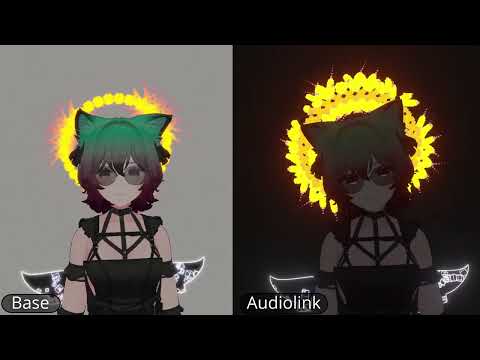
If you’ve spent an afternoon in Unity trying to get a halo or bracelet that actually reacts to music in VRChat, you know the gap: most free audio-linked accessories look generic, break on PC-only setups, or leave you wiring shaders by hand. Zekk’s Audio Ring for VRChat is a $13 shortcut for people who want a polished, customizable audio-reactive accessory without building the shader from scratch.
Quick answer
| Best for | VRChat avatar builders who want a ready-made, audio-reactive ring that can work as a halo, bracelet, or waist piece. |
| Skip if | You’re on mobile VRChat, use a render pipeline other than Built-in, or don’t want to install ThryEditor. |
| Price | $13 |
| Format | Custom shader + mesh pack + setup script + Geometry Nodes for advanced builds |
| One-line take | A compact, PC-only audio-reactive accessory kit that trades a small setup step for a lot of visual flexibility. |
What you’re actually buying
At $13, Audio Ring is not just a single mesh file. It’s a small toolkit: a custom shader built for audio reactivity, a set of selectable meshes, example materials, and a setup script that walks you through picking the right combination. The polygon range spans from 64 up to 3,000+ depending on the mesh you choose, which means you can keep things lightweight for performance or go denser for a more detailed look.
What makes this feel like more than a one-off prop is the flexibility baked into the design. The same audio-reactive ring can function as a halo above your head, a bracelet on your wrist, or a waist accessory—so one purchase covers multiple avatar slots. For advanced users, Zekk includes Geometry Nodes, which lets you create your own compatible meshes instead of being locked into the included options. That’s a rare touch at this price point, especially for a product in the VRChat avatar accessories space.
The one caveat is the dependency: the shader relies on ThryEditor, a free tool you’ll need to install manually if you don’t already have it. It’s a one-time setup step (download the zip, drag it into your Unity assets folder), but it’s worth knowing before you buy. The product is also PC-only, tested on Windows 10/11 with Unity 2022.3.22f1 and the Built-in Render Pipeline under DX11. If your workflow uses URP, HDRP, Vulkan, or OpenGL, you’re outside the tested scope. (Audio Ring (VRChat))
Why it’s on our radar
Most audio-linked accessories for VRChat are either free and generic, or expensive and locked into one specific look. Audio Ring from Zekk sits in a useful middle: it’s specific enough to feel crafted (custom shader, multiple mesh options, Geometry Nodes for custom builds) but priced low enough that it’s an easy “yes” if you’re already building avatars in Unity. The fact that it doubles as a halo, bracelet, or waist piece means you’re not buying a single-use prop—you’re buying a small audio-reactive system you can adapt across your avatar.
The included setup script is also a smart inclusion. For anyone who’s ever stared at a shader graph wondering which parameter controls the pulse, having a guided selection tool removes the friction that usually makes custom shaders feel like a chore. (Audio Ring (VRChat))
What actually matters
- ThryEditor dependency: If you don’t already use a shader that pulls in ThryEditor (Poiyomi does), you’ll need to install it manually. It’s a free, one-time step, but factor that into your setup time. (Audio Ring (VRChat))
- PC-only, Built-in RP only: The product is tested on Windows 10/11, Unity 2022.3.22f1, DX11, and the Built-in Render Pipeline. If your VRChat dev setup uses URP, HDRP, or a different GPU backend, you’re outside the guaranteed compatibility window. (Audio Ring (VRChat))
- VRCFury for auto-attach: If you want the ring to snap to your head automatically, VRCFury is required. Install it through the VCC if you don’t have it yet. (Audio Ring (VRChat))
- Geometry Nodes for custom meshes: This is the power-user feature. If you want to design your own ring geometry that still works with the audio shader, the included Geometry Nodes setup lets you do that without starting from zero. (Audio Ring (VRChat))
Mid-check
If you’re a PC-based VRChat avatar builder who’s been hunting for an audio-reactive accessory that doesn’t look like a free asset pack, this is a low-risk add to your Unity project. (Audio Ring (VRChat))
FAQ
Do I need any other paid tools to use Audio Ring? No. The only dependencies are ThryEditor (free, open-source) and VRCFury (free, via VCC) if you want auto-attach. The Audio Ring shader and meshes work with the Built-in Render Pipeline in Unity 2022.3.22f1.
Can I use this on mobile VRChat? No. The custom shader is PC-only. If your avatar workflow targets mobile, this won’t be compatible. (Audio Ring (VRChat))
Is the ring limited to one avatar slot? No. The design works as a halo, bracelet, or waist accessory, so you can place it in multiple slots across different avatars. The included setup script makes swapping between the provided meshes and materials straightforward.
Do I need to know how to use Geometry Nodes? Not at all. The included meshes and materials work out of the box. Geometry Nodes is there if you want to build your own custom ring geometry later. (Audio Ring (VRChat))
Bottom line
If you build VRChat avatars on PC and want an audio-reactive ring that looks intentional rather than placeholder, Audio Ring from Zekk is a $13 tool that earns its spot. You get a custom shader, multiple mesh options, a setup script, and Geometry Nodes for custom builds—all in one compact package. The ThryEditor install and PC-only constraint are the only real friction, and for most Unity-based avatar builders, that’s a five-minute setup trade for a lot of visual range.