FFX Collection: is this $49.99 stack worth it for Software Development?
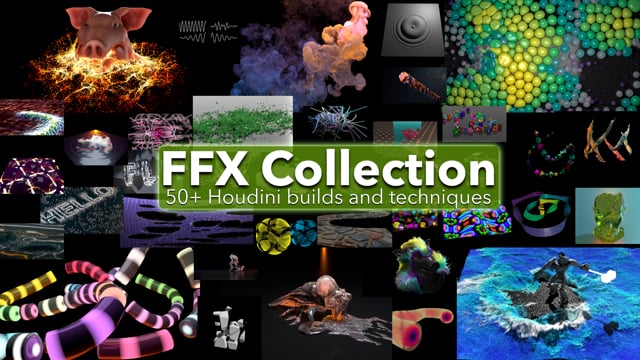
You know that specific Houdini frustration: you understand the theory of FLIP, RBD, or Vellum, but getting the actual node network to cook correctly without spending three hours debugging VEX comments or Karma XPU settings is a different beast. You don’t need another tutorial that leaves you staring at a blank viewport; you need a working reference that you can tear apart to see how the pros wire things up. That is the exact gap FFX Collection fills. It is not a course, and it is not a generic asset store. It is a dense, 50+ build library packaged into a single HDA that lets you generate complex, annotated setups in seconds, specifically designed for intermediate users who want to bridge the gap between “I know what a node does” and “I know how to make it work in a production-ready pipeline.”
Quick answer
| Best for | Intermediate Houdini users (19.5+) who want to study VEX, VOPs, and Karma XPU setups without building from scratch. |
| Skip if | You are a total beginner who doesn’t know what a SOP is yet, or if you are on Houdini 19.4 or older. |
| Price | $49.99 |
| Format | Single HDA file (67.9 MB) with 50+ procedural builds, fully commented VEX, and MaterialX materials. |
| One-line take | A $49.99 shortcut to understanding how to wire complex sims and renders, with the “Build It” button doing the heavy lifting. |
What you’re actually buying
At $49.99, you are buying a massive amount of “show your work” clarity. Most Houdini assets hide the logic; FFX Collection exposes it. The core deliverable is a single HDA that acts as a dropdown menu for over 50 distinct builds. You pick a topic—say, a PyroSolver setup or a Vellum cloth simulation—and click “Build It.” The tool generates the entire network for you, complete with netbox organization so you can see the flow of data. But the real value isn’t just the geometry; it’s the documentation built into the nodes.
The VEX code inside these builds is fully commented with explanations of different functions, which is rare and incredibly valuable for learning. If you are trying to get comfortable with VEX use cases, reading through the comments in a working, compiled setup is far more effective than reading a static script. Additionally, every render setup uses MaterialX with completely procedural materials. There are no external texture dependencies (except for native test geometry), meaning you can open these builds on any machine with Houdini 19.5 or newer and they will render exactly as intended. (FFX Collection)
The collection covers the full spectrum of Houdini’s toolset: FLIP, RBD, Vellum, POP, PyroSolver, SOPs, VOPs, VEX, LOPs, TOPs, COPs, Karma, and Material X. For those who want to dive into the entire library at once, there is a “Build All Of Them!” button. This is a thoughtful touch for power users who want to audit the whole stack, though it defaults to having each build turned off to prevent your machine from melting while everything cooks simultaneously. (FFX Collection)
Why it’s on our radar
This pack stands out because it solves the “blank page” problem for intermediate users who are ready to work but lack the time to wire every node from memory. The specificity of the deliverables—30+ builds including Karma XPU render setups and fully procedural MaterialX materials—means you are getting modern, production-relevant techniques, not just legacy SOP tricks. (FFX Collection)
The inclusion of a toggle for Sticky Note annotations is a smart feature for learners. You can choose to build a network with deep explanatory notes for study, or strip them away for a clean, netbox-only organization for your own projects. That flexibility makes FFX Collection useful both as a learning tool and as a quick-start kit for client work where you need a solid base to modify.
What actually matters
Before you buy, check your Houdini version. The compatibility requirement is strict: Houdini 19.5 or newer. If you are on an older version, these builds will not work, and the Karma XPU setups specifically rely on newer render engine features. (FFX Collection)
- Check your VEX comfort level: The builds are for intermediate users. If you don’t know what a VEX expression is, the comments will be helpful, but you might still struggle to modify the setups. If you are a total beginner, you might want to start with a fundamentals course first. (FFX Collection)
- Verify your GPU for Karma XPU: Since 30+ builds include Karma XPU render setups, you will need a compatible GPU to get the most out of the render examples. CPU rendering is used where XPU is not yet compatible, but the focus is clearly on the faster, modern pipeline. (FFX Collection)
- Look at the file size: The HDA is 67.9 MB. It is not a lightweight asset, but it is not bloated with external dependencies. It is a single, self-contained file that you can drop into your Houdini HDAs folder and start using immediately. (FFX Collection)
Mid-check
If you are ready to see the full list of 50+ builds and confirm the current price, you can view the details directly. (FFX Collection)
FAQ
Does FFX Collection work with Houdini Indie or Apprentice? Yes. As long as you are on Houdini 19.5 or newer, the HDA and its builds are compatible with all license types. The Karma XPU features will work if your hardware supports them, regardless of your license tier.
Are the materials procedural? Yes. All materials are completely procedural and use MaterialX. There are no outside texture files required, which makes the builds easy to move between machines and keeps the file size manageable at 67.9 MB. (FFX Collection)
Can I turn off the annotations? Yes. There is a toggle option in the HDA that lets you create each build either with Sticky Note annotations and netbox organization, or with netbox organization only. This is perfect if you want to study the logic first and then clean up the network for your own project. (FFX Collection)
Bottom line
If you are an intermediate Houdini user who wants to accelerate your learning curve by studying real, working, and fully commented networks, FFX Collection is a strong investment. It gives you 50+ builds across every major Houdini discipline, with the modern Karma XPU and MaterialX pipeline baked in. It is not a replacement for learning the fundamentals, but it is an excellent reference library that saves you hours of wiring and debugging.