Is IIF//BlenderTools#002 - MirrorTool worth buying right now?
If you are hard-surface modeling in Blender and you keep fighting the built-in mirror modifier or manually bisecting geometry to get a clean symmetry, you know the friction. Standard mirroring is often rigid: it flips the whole object, breaks your local axes, or leaves you with messy overlapping vertices at the seam. The IIF - Mirror Tool changes that workflow by turning a single hotkey into a context-aware operator that understands whether you are in Object Mode or Edit Mode, and what you have selected. It is a small, $5 utility that removes the “undo, redo, adjust modifier” loop and replaces it with a direct, immediate action.
This addon is built for modelers who care about topology and normals. It does not just flip a mesh; it bakes the reflection into the data so that joining mirrored objects later does not flip your normals. It handles the messy middle cases—like mirroring a single face to create a bisect, or mirroring a closed loop to create a bridge—that usually require a sequence of five or six separate tools. If you are working on sci-fi props, characters, or any asset where symmetry is key but needs to be broken or manipulated manually, this tool saves you from breaking your flow. (IIF//BlenderTools#002 - MirrorTool)
Quick answer
| Best for | Hard-surface modelers and Blender users who need fast, topology-safe mirroring in both Object and Edit modes. |
| Skip if | You only use Blender for simple 3D printing or do not care about normal direction and vertex merging at mirror seams. |
| Price | $5 |
| Format | Blender Addon (compatible with Blender 5.0+) |
| One-line take | A $5 workflow accelerator that makes mirroring feel like a native operator rather than a modifier hack. |
What you’re actually buying
At $5, you are not just buying a mirror function; you are buying a smarter way to handle symmetry. The core of the IIF - Mirror Tool is its dual-mode operation. In Object Mode, you can select multiple objects and mirror them all at once using one of three pivot modes: 3D Cursor, Local Origin, or World. This is crucial for complex scenes where objects have different rotations and origins. The addon includes a “Duplicate” option that creates a mirrored copy instead of transforming the original, which is perfect for building out symmetric components without losing your source geometry.
The real power, however, is in Edit Mode. Here, the tool is “context-aware.” If you select a single face, it performs a true bisect mirror along that face’s normal, trimming overhangs automatically. If you select a closed border loop, it temporarily fills it, mirrors across the average normal, deletes the fill, and merges the vertices. This specific behavior—automatically handling the fill and merge—saves you from the tedious manual process of filling, mirroring, deleting, and merging by hand. You also get a “Merge” option with an adjustable threshold to weld overlapping vertices at the mirror plane, ensuring your topology stays clean. (IIF//BlenderTools#002 - MirrorTool)
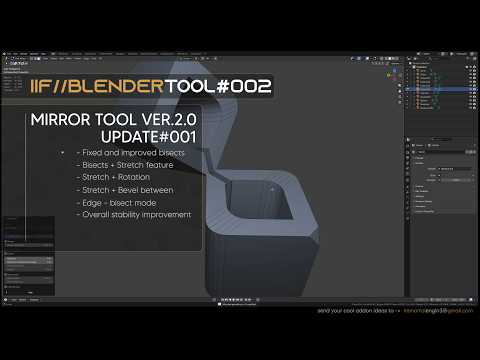
The latest version (2.1.1) adds even more depth with an “Edge-bisect” mode for single-edge mirroring and a “Distance outward with bridge” feature. This bridge feature creates connected geometry between the original and the mirrored side, complete with segment and rotation controls. For modelers who like to iterate quickly, these controls allow you to create complex, organic-looking symmetric forms without switching to a separate modeling tool. The IIF - Mirror Tool is designed to keep your hands on the keyboard and your eyes on the viewport.
One buyer noted the tool’s utility for “conceptualizing interesting sci-fi hard surface forms,” praising the clear UI and the creator’s quick response to bug fixes. Another user described it as a “creative way to get shapes,” noting how “happy accidents” come to life when playing with the tool. Gumroad reviews highlight that it feels “clearly made by a modeler for modelers,” a sentiment that resonates with anyone tired of generic modifiers that don’t respect the nuances of manual modeling.
Why it’s on our radar
This addon stands out because it solves a specific, high-friction problem in Blender: the gap between “mirror modifier” and “manual bisect.” Most users are forced to choose between a non-destructive modifier that requires constant updating and a destructive bisect that requires careful selection. The IIF - Mirror Tool bridges that gap by offering a destructive, immediate action that is still smart enough to handle normals and vertex merging.
The specificity of the Edit Mode behaviors is what makes it a strong value proposition at $5. The ability to mirror a single face by its normal, or a closed loop by its average normal, is a feature set that usually requires a custom script or a more expensive, complex addon. The fact that it works in both Object and Edit modes with a single hotkey (Alt + X) makes it a seamless part of the workflow rather than a separate tool to remember. (IIF//BlenderTools#002 - MirrorTool)
What actually matters
Before you buy, consider how you currently handle symmetry in Blender. If you frequently use the Mirror Modifier and then apply it, you might not feel the immediate benefit. However, if you are doing manual modeling where you need to bisect specific faces or create bridges between symmetric parts, this tool will save you significant time. (IIF//BlenderTools#002 - MirrorTool)
Check your Blender version. The listing specifies compatibility with Blender 5.0 and above. If you are on an older version, you may need to update before installing. The addon is a digital download, so you can install it immediately after purchase. (IIF//BlenderTools#002 - MirrorTool)
Look at the “Merge” threshold settings. This is a critical feature for keeping your topology clean. If you are working with high-poly models, you will want to fine-tune this threshold to ensure that vertices at the mirror plane are welded correctly without merging vertices that should remain separate. The IIF - Mirror Tool gives you this control, which is a step up from standard bisect operations.
Finally, consider the “Invert” option. This allows you to choose which side of the mirror plane is kept, which is useful when you want to trim a mesh rather than just mirror it. This level of control is rare in a $5 addon and makes it a versatile tool for both modeling and cleanup. (IIF//BlenderTools#002 - MirrorTool)
Mid-check
If you are a Blender user who models hard-surface assets or characters, this is a low-risk, high-utility purchase. The $5 price point is negligible compared to the time it saves in a typical modeling session. (IIF//BlenderTools#002 - MirrorTool)
FAQ
Does IIF - Mirror Tool work with the Mirror Modifier?
It is designed to work alongside or instead of the Mirror Modifier. If you are using the modifier for non-destructive workflows, you can use the IIF tool for quick, destructive adjustments. The tool does not replace the modifier but complements it by handling cases where the modifier is too rigid or cumbersome. (IIF//BlenderTools#002 - MirrorTool)
Can I use it on non-manifold geometry?
Yes, the tool is robust enough to handle non-manifold geometry, especially in Edit Mode where it can bisect faces or mirror loops. However, as with any mirroring tool, the quality of the result depends on the quality of the input geometry. Clean, well-structured topology will yield the best results. (IIF//BlenderTools#002 - MirrorTool)
Is there a refund policy?
As with most digital goods on Gumroad, the refund policy is set by the seller. You can check the specific terms on the IIF - Mirror Tool page. Given the low price and the active support from the creator, most users find that any issues are resolved quickly through the Discord server or email.
Bottom line
The IIF - Mirror Tool is a no-brainer for any Blender modeler who works with symmetric geometry. At $5, it removes a significant amount of friction from the modeling process, offering smart, context-aware mirroring that respects your topology and normals. Whether you are building a sci-fi prop or a character, this tool will make your workflow faster and more intuitive. If you are tired of fighting with the Mirror Modifier or manually bisecting geometry, this is the upgrade you need.