Instant Clean - Ultimate Mesh Clean Ble…: is this $9.99 stack worth it for Software Development?
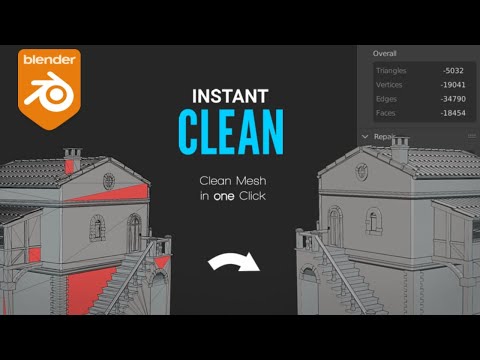
If you spend your evenings fighting with imported meshes in Blender—fixing flipped normals, deleting loose geometry, and manually dissolving degenerate edges—you know that cleanup is the tax you pay before the actual creative work begins. That repetitive, tedious process eats into the hours you actually want to spend modeling, texturing, or rendering. Instant Clean is a $9.99 Blender addon designed to collapse that entire cleanup routine into a single click, letting you automate the messy backend work so you can get back to the fun part of your 3D projects.
Quick answer
| Best for | 3D artists and hobbyists who import low-poly or kitbash assets frequently and want to skip manual cleanup steps. |
| Skip if | You only work with pristine, hand-modeled geometry or prefer to manually control every topology decision. |
| Price | $9.99 |
| Format | Blender addon (ZIP file) with free lifetime updates |
| One-line take | A one-click mesh repair tool that handles normals, topology, and loose geometry in one pass. |
What you’re actually buying
At under ten dollars, Instant Clean isn’t just a simple script; it’s a structured workflow tool that treats mesh cleanup as a system rather than a series of random clicks. The core of the addon is the “Ultimate Mesh Clean” function, which executes a full suite of operations simultaneously. You get a detailed report on exactly what happened to your mesh, so you aren’t left guessing whether the tool fixed the problem or just moved it.
The real power lies in the Preset System. Instead of running the same sequence of repairs every time you import a new asset, you can save your preferred cleanup settings as a preset. This is particularly useful if you work with specific types of assets—like low-poly game props or high-res sculpted characters—each of which might require different topology or normal handling. You can also break down the process and run individual components like Repair, Normals, Dissolve, or Topology on their own, giving you granular control when you need it. (Instant Clean - Ultimate)
The addon supports a wide range of Blender versions, from 2.93 all the way through 3.5, ensuring that whether you are on a stable release or the latest version, the tool remains compatible. It also includes an Object Data cleaner, which helps remove unused slots and groups that often clutter imported files. For the price, you are getting a comprehensive repair stack that covers the most common headaches of importing third-party models, plus a Discord community for support if you ever get stuck. (Instant Clean - Ultimate)
Why it’s on our radar
This tool stands out because it targets a very specific, universal pain point in the 3D workflow: the gap between “I downloaded this cool model” and “I can actually use this model.” Many artists have a library of kitbash parts or downloaded assets that sit unused because the cleanup process feels like a chore. Instant Clean removes that friction by making the repair process instant and repeatable.
The fact that it includes a detailed result log is a nice touch for artists who care about data integrity. You know exactly what the addon did, which is rare for “one-click” solutions that often feel like black boxes. It’s a small investment that pays off every time you import a new asset, making it a high-value utility for anyone who works with external geometry. (Instant Clean - Ultimate)
One buyer shared how quickly the tool integrated into their daily routine: “Wow! I am just sad I didn’t knew this addon existed sooner! I just bought it and I am so happy I did, it saved me so much time already. It’s on my top 5 addons really. Just buy it” Gumroad reviews.
Another user highlighted its effectiveness on their specific workflow: “Just brilliant. Pretty much one-click tidy-up of meshes. I’ve lots of kitbash bits and pieces bought online and this just cleans them up instantly, ready for UVing or render.” Gumroad reviews.
What actually matters
When evaluating a mesh cleanup tool, the most important factor is how it handles complex topology. Instant Clean includes a specific Topology converter, which is crucial for artists who need to switch between quad and tri meshes for different rendering engines or game pipelines. If you are working on game assets, this feature alone justifies the purchase.
You should also check the Preset System against your typical asset types. If you mostly import low-poly props, a preset that focuses on dissolving degenerate edges and fixing normals might be your go-to. If you work with high-poly sculpts, you might want a preset that prioritizes smoothing and normal correction. The flexibility to create these custom workflows is what separates a basic script from a professional tool. (Instant Clean - Ultimate)
Finally, consider the version compatibility. The addon supports Blender versions 2.93 through 3.5. If you are running an older version of Blender or have recently updated to 3.5, this tool is ready to go without any compatibility headaches. (Instant Clean - Ultimate)
Mid-check
If you are ready to streamline your import workflow, you can grab the addon now. (Instant Clean - Ultimate)
FAQ
Does Instant Clean work with the latest Blender versions? Yes, the addon is compatible with Blender versions 2.93, 3.0, 3.1, 3.2, 3.3, 3.4, and 3.5. This wide support range ensures that Instant Clean works whether you are on a stable release or the newest version.
Can I use the tool on individual mesh components? Absolutely. While the “Ultimate Mesh Clean” runs all operations at once, you can also execute individual parts like Repair, Normals, or Dissolve on their own. This allows for detailed results when you only need to fix a specific issue rather than the whole mesh. (Instant Clean - Ultimate)
Is there a refund policy or support available? The addon comes with free updates, and the seller provides support through a Discord community. If you have questions about how a specific feature works on your mesh, you can reach out there for help with your Instant Clean setup.
Bottom line
If you are tired of manually fixing normals and deleting loose edges every time you import a model, Instant Clean is a no-brainer at $9.99. It turns a tedious, multi-step process into a single click, and the preset system means you can tailor the cleanup to your specific asset types. It’s a small price for a tool that saves you time on every single import.