Investment Tracker: is this $6.99 stack worth it for Business & Money?
Quick answer
| Best for | Notion users who want a single, pre-built workspace to track holdings, review performance, and manage investment tools without building from scratch. |
| Skip if | You need a full brokerage API integration, a custom-built financial model, or you prefer spreadsheets over a dashboard-style interface. |
| Price | $6.99 |
| Format | Notion template with lifetime access, updates, and a step-by-step setup tutorial. |
| One-line take | A low-friction entry point for getting your portfolio into one visible, manageable Notion view. |
What you’re actually buying
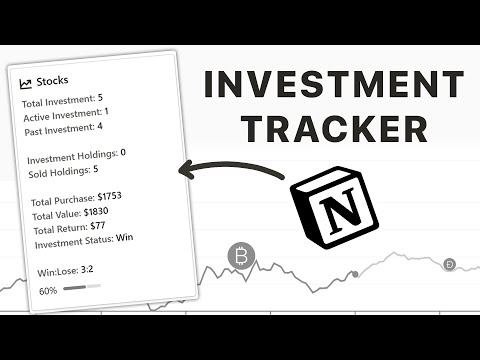
Most people don’t fail at investing because they lack data; they fail because that data is scattered across broker apps, spreadsheets, and mental notes. Investment Tracker solves that fragmentation by giving you a centralized Notion workspace where you can log positions, monitor status in real time, and see your entire portfolio’s health at a glance. The core value here isn’t just storage—it’s the insightful dashboard that turns raw numbers into a holistic view of your performance, making it easier to spot what’s working and what needs attention.
Beyond simple tracking, the template includes an investment review structure designed to help you evaluate and refine your strategy over time. This is where the product moves from a passive log to an active management tool. You get a dedicated space to assess your holdings and make intentional adjustments, rather than just reacting to market noise. The tool management feature also helps you keep track of the various platforms and utilities you use, ensuring you aren’t juggling multiple interfaces just to get a complete picture of your financial position. (Investment Tracker)
At $6.99, you’re paying for the time saved in setup. The package includes lifetime access and updates, so if the seller refines the formulas or adds new views, you get those improvements without a second purchase. A step-by-step tutorial is also included, which is crucial for anyone who isn’t deeply fluent in Notion’s database architecture. You don’t have to reverse-engineer the connections between your holdings and your dashboard; you just follow the guide and start tracking. (Investment Tracker)
One buyer noted that the template is a “highly effective tool for managing investments,” highlighting how the structure reduces the friction of staying on top of your portfolio. If you’ve been struggling to keep a consistent record of your buys and sells, this pre-built system offers a straightforward way to get organized without the overhead of a custom build. (Investment Tracker)
Why it’s on our radar
This product stands out because it targets a specific pain point: the lack of a unified view for diverse investment portfolios. Many free templates stop at a simple table, but Investment Tracker includes a dashboard and review workflow, which adds a layer of strategic utility. For solo investors or small business owners who need to keep their personal and professional investments organized, this level of structure is rare at such a low price point.
The inclusion of a tutorial and lifetime updates makes it a low-risk purchase. You’re not just buying a static file; you’re getting a maintained system that can evolve as your portfolio grows. It’s a practical choice for anyone who wants to move away from ad-hoc tracking and into a more disciplined, visual management process. (Investment Tracker)
What actually matters
Before you buy, consider how you currently track your investments. If you’re using a spreadsheet with complex formulas, migrating to Notion might feel like a step backward unless you value the visual dashboard and relational database features. However, if you’re starting from scratch or struggling with a clunky manual system, the investment tracking and management features in Investment Tracker will likely feel like a significant upgrade.
Check the tutorial carefully. Since this is a Notion template, the value depends on your comfort level with the platform. If you’re new to Notion, the step-by-step guide is essential for setting up the databases correctly. If you’re a power user, you might want to review the dashboard design to ensure it aligns with your preferred layout. (Investment Tracker)
Finally, think about your review cadence. The investment review section is only as useful as your commitment to using it. If you’re not ready to do quarterly or annual strategy reviews, the template might sit unused. But if you’re looking to formalize your approach to portfolio management, this tool provides the scaffolding to do so. (Investment Tracker)
Mid-check
FAQ
Is this template suitable for beginners? Yes, the inclusion of a step-by-step tutorial and the focus on “investors of all levels” suggests it’s designed to be accessible. You don’t need advanced Notion skills to get started, though some familiarity with basic databases will help you navigate the investment management features more comfortably. (Investment Tracker)
Does it integrate with my brokerage? No, this is a manual tracking template. You will need to input your investment data yourself. The benefit is that once entered, the insightful dashboard provides a clear view of your performance without needing to log into multiple broker accounts. (Investment Tracker)
What happens if I need to add new investment types? The template is designed to be flexible, but you may need to adjust the database properties if you’re tracking unconventional assets. The tool management section can help you keep track of these different categories, ensuring you have a holistic view of your diverse portfolio. (Investment Tracker)
Bottom line
If you’re tired of chasing your portfolio data across multiple apps and want a single, visual hub to manage your investments, Investment Tracker is a solid choice. At $6.99, you get a complete system with a dashboard, review workflow, and tutorial—making it an easy yes for anyone looking to bring structure to their financial tracking.