Is Mo_Comps worth it if you’re shopping in Films?
You know the exact moment a motion project stalls. You’ve got the concept locked, the client is breathing down your neck, and you’re still manually dragging in a 1:1 comp, adjusting the frame rate, and naming layers. It’s a repetitive, low-value task that eats into the hours you should be spending on actual animation. That friction is exactly what Mo_Comps is built to eliminate. It’s not a generic template pack; it’s a dedicated script for After Effects that automates the boring setup so you can jump straight into the creative work.
For motion designers who work across multiple studios or handle a high volume of social assets, remembering the right ratios and durations for every new project is a mental tax. Mo_Comps removes that tax with a single panel that generates your comps for you. At just $10, it’s a low-risk investment that pays off every time you open a new project, turning a five-minute manual setup into a two-second click.
Quick answer
| Best for | Motion designers who need to spin up multi-ratio comps (1:1, 16:9, 4:5) quickly without manual setup. |
| Skip if | You don’t use After Effects, or your workflow relies on highly custom, non-standard comp structures that this script doesn’t cover. |
| Price | $10 |
| Format | After Effects script with a single control panel. |
| One-line take | A $10 time-saver that automates comp setup so you can focus on animation, not administrative work. |
What you’re actually buying
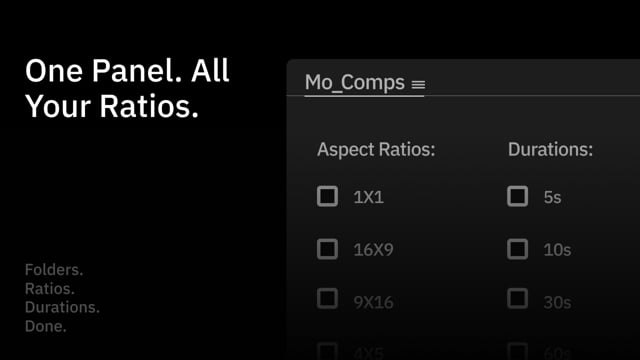
At first glance, a $10 script might seem like a minor add-on, but the value here is in the speed and structure it brings to your daily workflow. When you install Mo_Comps, you get a single, clean panel that sits in your After Effects workspace. Instead of manually creating a new composition, setting the width and height, adjusting the duration, and then tweaking the frame rate, you simply select your preferences from a dropdown. The script handles the rest, generating the comp with the correct settings in one go.
The real power is in the multi-ratio generation. If you’re working on a social media campaign, you likely need the same animation in a 1:1 square for Instagram, a 16:9 widescreen for YouTube, and a 4:5 vertical for Stories. Mo_Comps lets you generate all of these simultaneously, organized neatly in folders. This isn’t just about saving time; it’s about keeping your project files clean and professional. The script automatically structures your layers and folders, so your project file is organized from the moment it’s created.
Beyond the basic ratios, the script offers a level of control that’s rare for a tool this simple. You can choose from standard duration presets—5s, 10s, or 30s—which cover the vast majority of social and web assets. You can also set a custom frame rate and add tags to your comps. These small features add up. If you’re working on a project with a specific 24fps requirement or need to tag comps for a client review, you don’t have to remember to do it manually. Mo_Comps bakes it into the setup process.
One reviewer on Gumroad reviews called it a “Huge time-saver for motion designers. It’s streamlined my workflow and quickly became an essential tool. Highly recommend!” That’s the kind of feedback that sticks. When a tool becomes “essential” in your daily routine, it’s no longer a novelty—it’s a part of your process. For a designer who works across multiple branding systems, the ability to spin up a clean, structured comp in seconds is a game-changer.
Why it’s on our radar
This is a tool that solves a specific, recurring pain point for motion designers. It’s not a massive template library or a full-blown plugin suite; it’s a focused utility that does one job exceptionally well. The fact that it was built in collaboration with Coddit-64, a well-known name in the motion design community, adds a layer of credibility. You can trust that the tool is built with an understanding of how professional motion designers actually work. (Mo_Comps)
The price point is also a major factor. At $10, it’s an easy “yes” for anyone who spends more than a few hours a week in After Effects. The return on investment is immediate. If Mo_Comps saves you even five minutes per project, it pays for itself within the first day. And because it’s a one-time purchase with no subscription, you’re not locked into a recurring cost for a tool that will likely become a permanent part of your workflow.
What actually matters
Before you buy, consider your current workflow. If you’re already using a custom script or a template library that handles comp setup, you might not need this. However, if you’re still doing it manually, the time savings will be significant. The script is designed for After Effects, so it won’t work in other compositing software. (Mo_Comps)
Another thing to check is your project structure. The script automatically organizes your comps into folders, which is great for keeping things tidy. But if you have a very specific, non-standard folder structure that you’re required to follow, you might need to adjust the script’s settings or do some manual cleanup. For most users, though, the default organization is a welcome boost in professionalism. (Mo_Comps)
Finally, think about the types of projects you work on. If you’re primarily doing long-form video or broadcast work, the 5s, 10s, and 30s duration presets might not be as useful. But if you’re working on social media, web, or short-form content, these presets will cover 90% of your needs. Mo_Comps is a tool that shines in fast-paced, multi-format environments.
Mid-check
If you’re ready to streamline your comp setup and get back to the creative work, See current options to grab your copy of Mo_Comps.
FAQ
Is Mo_Comps compatible with all versions of After Effects?
The script is designed for modern versions of After Effects. It’s best to check the product page for the specific version requirements, but it should work with most recent releases. If you’re on an older version, it’s worth verifying compatibility before purchasing. (Mo_Comps)
Can I use Mo_Comps for client work?
Yes. The script is designed for professional use. It helps you create clean, organized project files, which is a plus when delivering work to clients. The automatic folder and layer naming is a small detail that can make a big difference in how your work is perceived. (Mo_Comps)
What if I don’t like it?
Digital products are typically non-refundable, so it’s important to read the product description carefully. However, the low price point means the risk is minimal. If you find that it doesn’t fit your workflow, you can always sell it or pass it on to another motion designer. (Mo_Comps)
Bottom line
Mo_Comps is a no-brainer for motion designers who want to eliminate the friction of comp setup. It’s a small, focused tool that does one thing well: it automates the boring parts of your workflow so you can focus on the creative. At $10, it’s an easy investment that will pay for itself in saved time and reduced mental load. If you’re tired of manually setting up comps, Mo_Comps is the tool you’ve been looking for.