The Ultimate Introduction to V-Ray for …: is this $79 stack worth it for 3D?
Quick answer
| Best for | Blender artists who need to move from Cycles to V-Ray for commercial-grade speed, or anyone stuck in the “tutorial hell” of learning V-Ray features in isolation. |
| Skip if | You are a total 3D beginner (this assumes you can model and navigate Blender), or you are strictly committed to Cycles and have no need for V-Ray’s specific render pipeline. |
| Price | $79 |
| Format | 65 HD video lessons (13+ hours) + .blend project files |
| One-line take | A comprehensive, structured curriculum that treats V-Ray as a professional tool, not just a plugin, with every file included so you can learn by doing. |
What you’re actually buying
If you’ve ever felt like V-Ray for Blender is a black box—powerful but intimidating, with settings that seem to change every time you open a new scene—this course is designed to break that code. At $79, you aren’t just buying a list of features; you are buying a 13-hour, 65-lesson structured path that takes you from the basics of the interface to complex lighting and material setups. The value here lies in the completeness: it’s not a “5 tips for V-Ray” short-form video; it is a full curriculum that covers the entire workflow. (The Ultimate Introduction to V-Ray for Blender)
The course is built around practical application rather than abstract theory. You get the project files in .blend format for every lesson, which is the single most important feature for a 3D learner. Instead of trying to replicate a complex scene from scratch while you’re still learning the software, you can open the instructor’s file, see exactly how the nodes are connected, and tweak the settings yourself. This “learn by dissecting” approach is how you actually build muscle memory in a DCC like Blender. (The Ultimate Introduction to V-Ray for Blender)
The curriculum is dense but logical. It starts with the fundamentals of color management (specifically ACEScg and sRGB workflows, which are often where beginners get their colors wrong) and moves into the heavy lifting: lighting. You’ll learn to use a full suite of V-Ray light types, from Area and Mesh lights to IES profiles and procedural clouds. But the standout feature is the depth of the lighting section, which includes LightMix—a tool that lets you adjust light intensity and color after the render is complete. That is a massive time-saver for commercial work, and this course teaches you how to use it effectively. (The Ultimate Introduction to V-Ray for Blender)
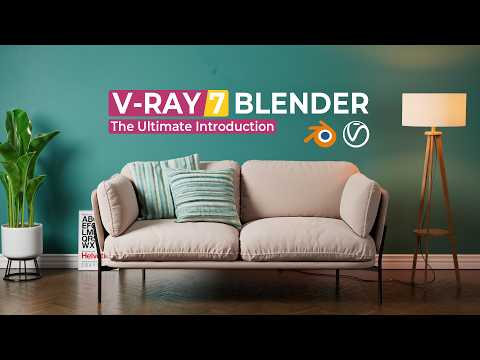
The course is recorded in HD 1080p at 60 FPS, ensuring that even when the instructor is zooming into a node graph or adjusting a subtle material parameter, the detail is crisp enough to follow along without squinting. It’s built for Blender 4.5.2 LTS and V-Ray 7.10.00, which means you are learning on the current, stable versions of the software. If you are using an older version, the concepts still apply, but the interface will match what you see in the videos if you are on the latest LTS. (The Ultimate Introduction to V-Ray for Blender)
Why it’s on our radar
This course is interesting because it bridges the gap between “I know Blender” and “I can deliver a commercial render with V-Ray.” Many V-Ray courses are either too basic (just showing you where the button is) or too niche (focused only on one type of material). This one covers the entire ecosystem: lighting, color management, and the specific workflow of integrating V-Ray into a Blender project. (The Ultimate Introduction to V-Ray for Blender)
The fact that it includes 65 videos is a strong signal of depth. You are not getting a 30-minute “intro” that leaves you confused after the first hour. You are getting a structured learning path that respects the complexity of the engine. The inclusion of LightMix and procedural clouds in the curriculum shows that the instructor is teaching you the tools that actually save time in a production environment, not just the tools that make for pretty demo renders. (The Ultimate Introduction to V-Ray for Blender)
A Gumroad review highlights the practical value: “This course is well organized, easy to follow, and clear content. Highly recommend. I know Cycles is great for high-production renders, but V-Ray is fast and easy to use.” Another buyer notes that despite the “Introduction” in the title, it is a “full comprehensive V-Ray course” that is “literally the only course u need to become a Pro.” That is a strong endorsement of the course’s depth and structure.
What actually matters
Before you buy, keep these three points in mind to ensure this is the right fit for your current skill level: (The Ultimate Introduction to V-Ray for Blender)
- You need to know Blender basics: This course assumes you can model, navigate the viewport, and understand the node editor. If you are still learning how to extrude a cube or use the timeline, you will be overwhelmed. This is a V-Ray course, not a Blender course. (The Ultimate Introduction to V-Ray for Blender)
- Version compatibility: The course is built for Blender 4.5.2 LTS and V-Ray 7.10.00. If you are on an older version, you may need to update your software to follow along perfectly. The concepts are stable, but the UI will differ. (The Ultimate Introduction to V-Ray for Blender)
- The “Project Files” are key: The value of this course is heavily dependent on the included .blend files. Make sure you are comfortable opening and dissecting other people’s files. If you prefer to build everything from scratch, you will miss out on the fastest way to learn V-Ray’s node structure. (The Ultimate Introduction to V-Ray for Blender)
Mid-check
FAQ
Is this course for beginners in 3D? No. This is an introduction to V-Ray, not an introduction to 3D. You need to be comfortable with Blender’s modeling and UI. If you are new to 3D, start with a Blender fundamentals course first. (The Ultimate Introduction to V-Ray for Blender)
Does this cover Cycles? No. This course is specifically for V-Ray for Blender. If you are using Cycles, this is not the right course for you. V-Ray and Cycles have different workflows, node structures, and render settings. (The Ultimate Introduction to V-Ray for Blender)
Will I get the project files? Yes. Every lesson includes the corresponding .blend project file. This allows you to open the instructor’s scene, see the node setup, and practice by modifying the settings. (The Ultimate Introduction to V-Ray for Blender)
Bottom line
If you are a Blender artist who wants to add V-Ray to your toolkit for faster, more controllable renders, The Ultimate Introduction to V-Ray for Blender is a strong investment. At $79, you get a comprehensive, 13-hour curriculum with all the project files you need to learn by doing. It is structured, detailed, and focused on the tools that matter for professional work. If you are ready to move beyond Cycles and explore the power of V-Ray, this is the course to start with.