Is 'Red Night' Animated Stream Overlay Pack | Red Night Vertical Stream Overlay Package | Twitch Stream Overlay Pack | YouTube Stream Overlay worth it if you’re shopping in Gaming?
Quick answer
| Best for | Streamers who want a cohesive, dark-red aesthetic across Twitch, YouTube, and vertical mobile streams without paying $50+ for a custom design. |
| Skip if | You need editable project files (After Effects/Photoshop) to tweak the graphics, or if you prefer a minimalist, non-animated look. |
| Price | $4 |
| Format | PNG/WebM assets + Font + Icons (No project files included) |
| One-line take | A massive 100+ asset bundle that covers every screen and alert for both landscape and vertical streaming at a price that costs less than a coffee. |
What you’re actually buying
Most streamers hit a wall where they have a decent game setup but their overlays look like a patchwork of free templates from three different designers. The “Red Night” Animated Stream Overlay Pack from Fun Founder solves this by providing a complete, thematically consistent visual language for your channel. For four dollars, you aren’t just getting a few alert boxes; you are getting the entire skeleton of a broadcast. This includes 15 animated alerts, 51 panels, and 21 icons, all unified by a specific font and a dark, moody red color palette that works well for horror, competitive gaming, or just a sleek, professional vibe.
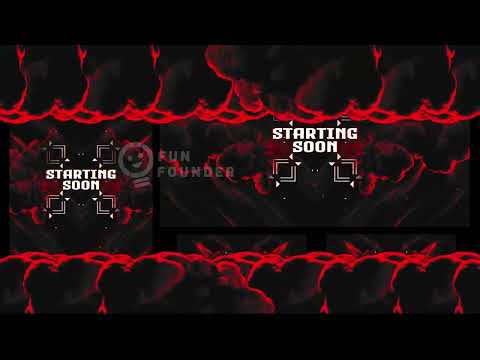
What makes this pack stand out in the low-price tier is the inclusion of a dedicated vertical overlay folder. If you stream to mobile viewers on TikTok, YouTube Shorts, or Twitch mobile, you usually have to manually resize and crop your landscape assets, which looks messy. Here, you get specific vertical variants for your “Be Right Back” screen, “Starting Soon” screen, and main stream screens. That means your mobile audience sees a layout designed for their screen, not a squished version of your desktop stream. (“Red Night” Animated Stream)
You also get the “boring” but essential stuff that keeps a stream looking clean: 5 timer assets, a title bar, and 7 face-cam frames with alpha masks. The alpha masks are particularly useful because they let you frame your webcam with the same red aesthetic as your rest of your stream, creating a seamless integration between your face and your graphics. Since the pack includes blank PNG and WebM files, you can drop in your own text and branding quickly without needing to learn video editing software. (“Red Night” Animated Stream)
Why it’s on our radar
This pack is a strong value play for new streamers who are ready to upgrade from the default Streamlabs templates but aren’t ready to spend $100+ on a custom artist. The sheer volume of assets—over 100 files including both landscape and vertical versions—is rare at the $4 price point. Most packs at this price offer 10-15 assets; this one covers every single screen you need for a full broadcast cycle, from the “Starting Soon” screen to the “Ending” screen, plus all the intermission and offline states. (“Red Night” Animated Stream)
The specific inclusion of animated alerts and stingers adds a layer of polish that static PNGs can’t achieve. A simple fade-in alert feels different from an animated “Red Night” alert that pulses or slides in, and these animations help keep viewers engaged during chat events. It’s a practical choice for anyone who wants their channel to look “finished” immediately after purchase, without the wait time of commissioning custom work.
What actually matters
Before you buy, keep in mind that this pack does not include project files. You are getting the final rendered assets (PNGs and WebMs) and blank files to edit text on, not the source files. If you need to change the color scheme from red to blue or redesign the layout from scratch, this won’t work for you. You are buying a finished theme, not a toolkit for building a theme. (“Red Night” Animated Stream)
Check the file formats for your streaming software. The pack includes WebM files for animations, which are supported by OBS Studio and Streamlabs. If you are using a very old or niche streaming encoder that doesn’t support WebM, you might need to convert the animations to MP4, which can sometimes cause transparency issues. For 99% of modern streamers using OBS, this is a non-issue, but it’s worth verifying if you have a unique setup. (“Red Night” Animated Stream)
Finally, consider the license. The license is for one streaming profile. If you are a streamer who also does IRL content on a separate account or has a secondary channel for a different genre, you would need to purchase the pack again for that second profile. It’s a standard single-use license, so just make sure you’re buying it for the channel you actually plan to use it on. (“Red Night” Animated Stream)
Mid-check
If you’re ready to lock in that dark, cohesive look for your next stream, you can grab the full asset pack right now. (“Red Night” Animated Stream)
FAQ
Does this pack work for both Twitch and YouTube? Yes, the assets are standard PNG and WebM files that work in any streaming software, including OBS Studio and Streamlabs, which are the standard for both Twitch and YouTube. The vertical assets are specifically useful for YouTube Shorts or mobile viewers. (“Red Night” Animated Stream)
Can I edit the design of the alerts? You can edit the text and some elements using the blank files provided, but you cannot change the core design, colors, or animation paths because no project files are included. The design is fixed to the “Red Night” theme.
Are the vertical assets just resized versions of the landscape ones? No, the listing specifies a separate “Vertical Overlay Screens Folder” with specific assets like “Be Right Back_Vertical” and “Main Screens_Vertical.” These are designed for portrait aspect ratios, not just cropped landscape files. (“Red Night” Animated Stream)
Bottom line
If you want a complete, professional-looking stream setup that matches across desktop and mobile without spending a fortune, the “Red Night” pack is a no-brainer. The $4 price tag is almost an impulse buy, but the value is in the completeness: you get every screen, every alert, and the vertical variants needed for a modern, multi-platform stream. It’s a quick way to go from “default template” to “curated channel” in under an hour.